

At Academy of Therapy Wisdom, we want to help you be the best therapist you can be with our online therapy courses and supportive therapist resources. We’ve been doing therapy training online for years, but we’ve noticed that in the last few years a lot more of the actual therapy is happening online as well. So we put together this two-part guide on how to use Zoom for online therapy sessions.
Some therapists have been doing online sessions for a long time, but since the Covid-19 Pandemic began, it’s become unavoidable.
You probably didn’t become a psychotherapist because you wanted to work on a computer all day.
Psychotherapy is about people, about sitting face to face with a client and talking about things they can’t talk about with anyone else. It’s not meant to take place with two computer screens and sometimes thousands of miles in between therapist and client.
And yet this new era of online therapy has opened up unprecedented access to psychotherapy for people who couldn’t otherwise get to a therapist’s office, or find just the right therapist in their area. For better and worse, this new world is here to stay, and therapists are learning to adapt.
Hi, I’m Asa. I support our training for therapists as the Video Production Manager.
I’m not a psychotherapist, but I’ve run Zoom tech support for many leading therapy experts teaching online therapy courses, so I’ve learned a few things about how to set things up so that the technology stays out of the way and therapists can connect with their clients.
Here are the most important technical tips for excellent zoom sessions.
Make Sure Your Face Isn’t Too Dark
Computer cameras adjust automatically to the amount of light in the scene, but they don’t always do it very intelligently. If there’s a lot of light behind you, then the camera will adjust to it and your face will be too dark to see. For example, sitting with a window behind you is generally a big no-no.
There are two ways to deal with this. One is to move to another location where there is more light in front of you than behind you. This could be as simple as turning around 180 degrees so you’re facing the opposite direction. I have my desk set up so I’m looking at the window. That way there’s plenty of light on my face for Zoom calls, and I get to gaze out the window when I’m thinking about what to write next in a blog post.
But moving to a different location may not always be practical. Sometimes you only have one place in your house or office where you can hook up your computer and the background looks decent. If your only good places to sit have a bright background behind you, then you need to invest in a light.
Ring lights have become a popular choice for lighting your face for Zoom meetings. Lumecube also makes some great lights that sit on your desk and can be adjusted for brightness and color.
Adjust your camera for more personal connection on Zoom
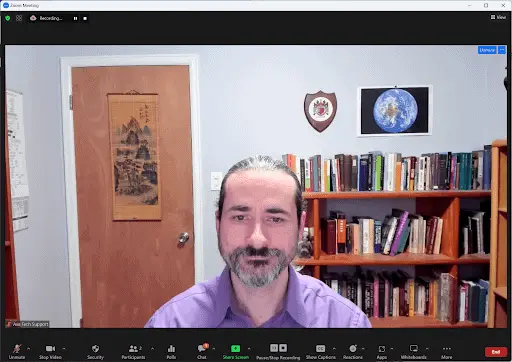

Which of these images is easier to connect with?
Being on Zoom instead of in the therapy room already makes it harder to transmit the subtle nonverbal cues that help a therapist create safety for a client. Don’t make it even harder by making your face too small in the video frame. Arrange your computer camera so that there’s just an inch or two between the top of your head and the top of the Zoom image. If you can frame it so that they can also see your chest and arms, even better.
You can usually achieve this just by moving your computer closer to you, and maybe putting a couple of big psychotherapy textbooks underneath it if it looks like the camera is looking up your nose. Having your camera at eye level is ideal.
Another trick is to move your zoom window around on your screen so that when you’re looking at your client’s picture, you’re looking as close as possible to the physical camera on your computer (usually just above the center of the screen).
If you want even finer control, you can get a camera with software that allows you to zoom in and out. My top recommendation for great image quality and ease of use is the Logitech Brio webcam. If you download the Logitech G-Hub software, you can zoom in and out. If you want to get nerdy with it, you can also adjust the color (white balance), brightness (exposure), contrast, saturation, and more.
If your computer has a built-in camera, there are apps that allow you to have more control over it as well, so you might not need to buy a new webcam.
In part two of this tutorial, we cover sound for psychotherapy sessions on Zoom.

JOIN a FREE Training with Dr. Tori Olds
Introduction to Deliberate Practice in Psychotherapy
In this video series, you will learn:
The essential problem with most other therapy training programs.
Six myths about becoming a more effective therapist.
What Deliberate Practice is and why it is so important
The five steps on the roadmap for clinical excellence